Zero to AI Hero
First of all, you're not a zero. I'm sorry I said that.
Most people I talk to about AI fall into one of two camps. Either they've tried ChatGPT a few times and weren't impressed, or they're using it and creating real value every day, but suspect they're only scratching the surface. Both groups are actually right. The gap between casually asking an AI a question and actually using it well is bigger than most people realize, and it is growing all the time.
If you're in the skeptical camp, I'd ask you this honestly: have you used AI to do something beyond a basic conversation? Beyond quick searches and one-off questions? If not, I get why you'd be unimpressed. That's like judging a car by sitting in the driver's seat without turning it on. The real value shows up when you personalize it. When you connect it to your tools, give it context about your work, set up rules for how you want it to operate. Most people never get past the "ask it a random question" stage, and that's the least interesting thing AI can do.
I've spent the past few months going deep on this. I wanted to understand how AI actually works, why some interactions are productive and others are useless, and which tools are worth paying attention to. This is what I'd tell a friend who wanted to get up to speed, starting from zero and ending with you actually building something.
How AI actually works
You don't need a computer science degree to understand this. At a high level, AI breaks down everything you type into "tokens," which are basically small chunks of words. Each token carries context. The AI uses that context to predict the most likely next word, then the next one, and so on.
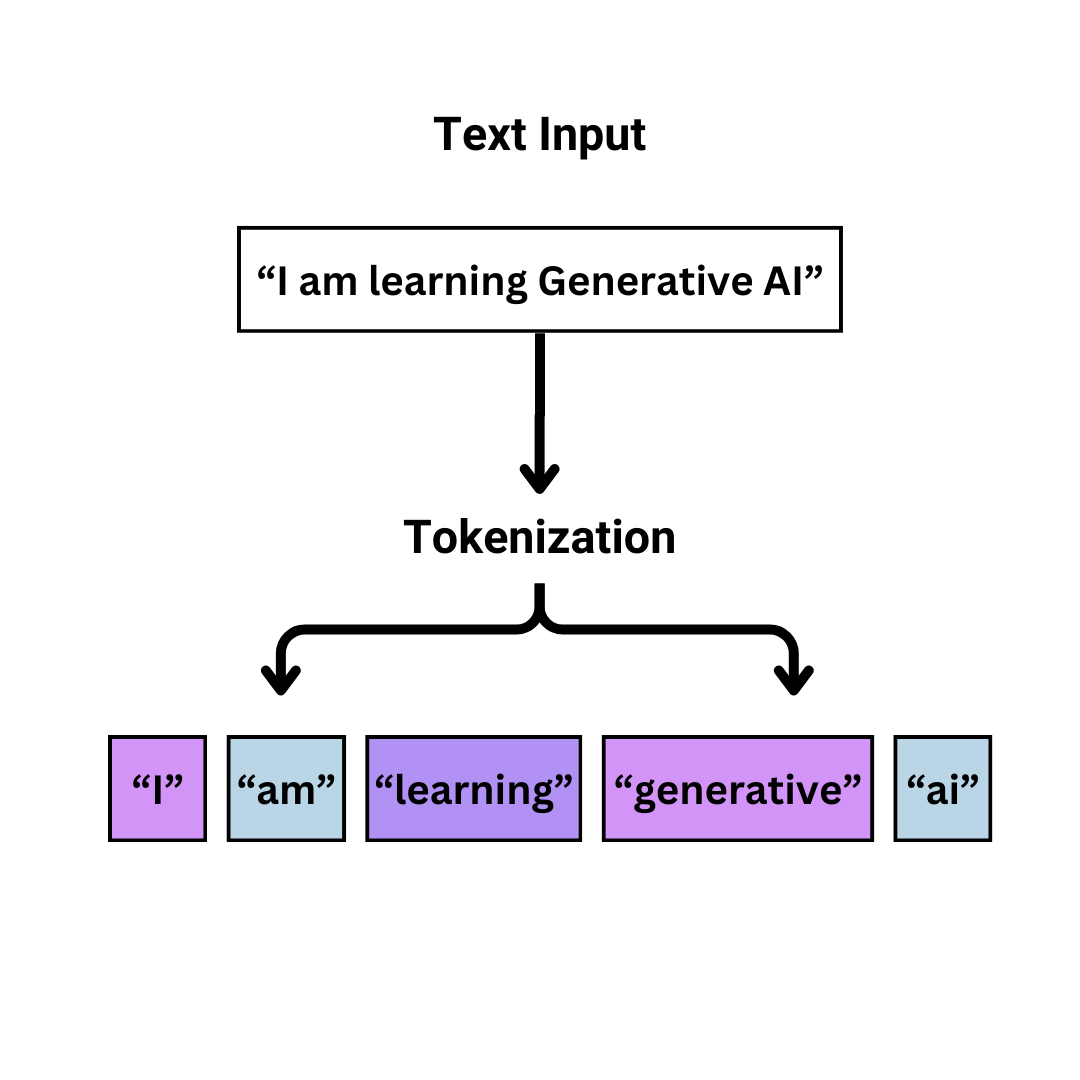
In 2017, a research paper introduced the concept of "attention," which changed everything. In short, attention is the ability for AI to figure out which words in a sentence matter most to each other. Before attention, AI processed words in order without much sense of which words in a sentence related to which. After attention, the model could look at a sentence like "I took my dog to the bank by the river" and figure out that "bank" here means a riverbank, not a financial institution, because it pays attention to the relationship between "bank" and "river." That sounds simple, but it's the difference between an AI that sort of understands language and one that actually gets what you mean. That ability to understand relationships between words, not just their order, is what made modern AI possible.
That's really it. At the most basic level, AI is a very sophisticated prediction engine. It's predicting what comes next based on patterns it learned from an enormous amount of text. Understanding this helps explain both why AI is so good at some things and why it occasionally gets things completely wrong. It's not thinking. It's pattern matching at a scale we've never had before.
If any of that feels fuzzy, here's one of the best things about AI: you can just ask it to explain itself. Type "explain tokens and attention like I'm 10" into Claude and you'll get a better explanation than most textbooks. That works for any concept in this article, or anything else you're curious about.
The anatomy of a good prompt
The single biggest factor in whether AI gives you something useful is how you ask. Most people write prompts like they're typing into Google: short, vague, hoping the tool figures out what they mean.
Here's a bad prompt: "Make me a better duck hunter than Ian."
Here's a good one: "I want to out-hunt my buddy Ian this season. We hunt mallards and teal on farmland ponds and marshes around Farmington, Utah along the Great Salt Lake flyway. I use a single-reed call and hunt over 12 decoys from a layout blind. My weak spots are feed chatter and reading wind for decoy placement. Give me a 4-week pre-season plan covering calling drills, decoy spreads for small water with wind diagrams, scouting tips for GSL-area public land, and a crossing-shot drill routine. One skill per week. Keep it concise."
The difference is context. The good prompt tells the AI who you are, what you already know, what you're trying to accomplish, and how you want the answer structured. You're not making it guess. You're giving it enough information to give you something genuinely useful.
The pattern works for everything, not just duck hunting. Whether you're asking for help with a work email, a business plan, or a coding problem, it's the same idea: more context upfront means better output. Tell it your situation, your constraints, and what "good" looks like. If you're not sure how to structure a prompt well, tools like Prompt Cowboy can take a lazy one-liner and expand it into something detailed with a situation, task, objective, and knowledge base.
The shift from chatbots to agents
This is the biggest change happening in AI right now, and most people haven't caught on yet.
A chatbot is simple: you ask, it answers, done. You're driving the entire conversation, message by message. That's what most people are doing when they use ChatGPT or Claude on the web.
An agent is different. You set a goal, and it plans, acts, checks its work, adjusts, and repeats. It can read and write files, run terminal commands, search the web, call APIs, and test its own output. Instead of answering a single question, it can work through a multi-step problem on its own.
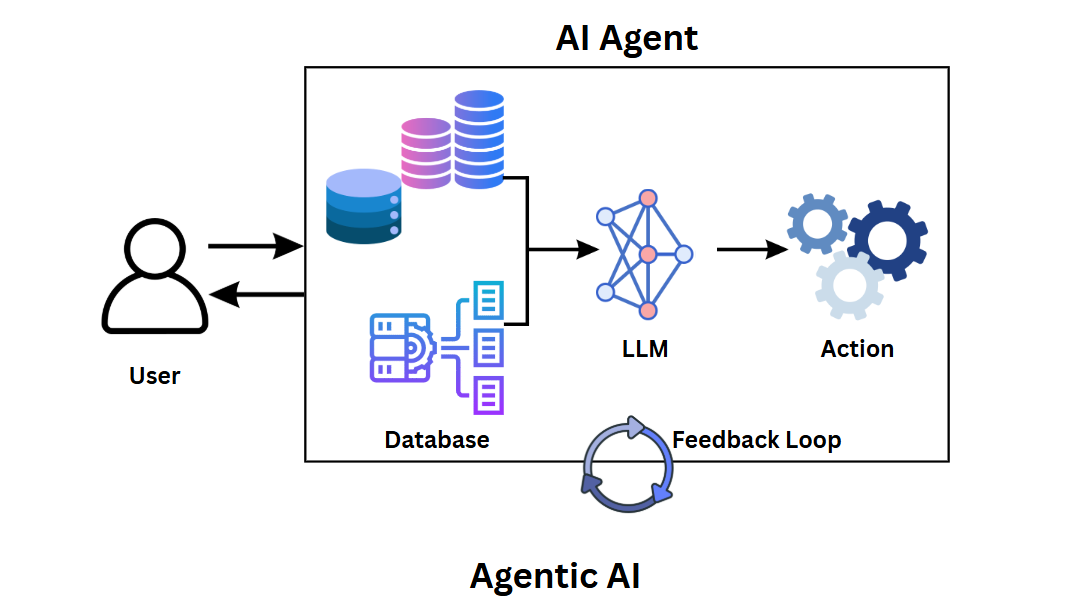
The practical difference is huge. With a chatbot, you're copy-pasting code snippets back and forth. With an agent, you can say "build me a landing page with a signup form and deploy it" and watch it actually do the work. You're steering instead of typing.
This is where tools like Claude Code come in. It's the tool I use most. It runs in your terminal, reads your codebase, writes files, runs commands, and manages complex multi-step tasks. I've used it to build full applications, run migrations, and ship features that would have taken me weeks to do manually. You can read more about my specific workflow in how I actually use AI to build things.
Connecting your tools
One of the main things that separates casual AI use from productive AI use is connecting multiple tools together.
Most AI platforms now support pre-built integrations. Claude, for example, can connect to Google Drive, Gmail, Calendar, Stripe, GitHub, iMessages, and more. That means you can do things like ask it to "check my email for anything urgent from this week and summarize it" or "look at my calendar for tomorrow and help me prep for my meetings."
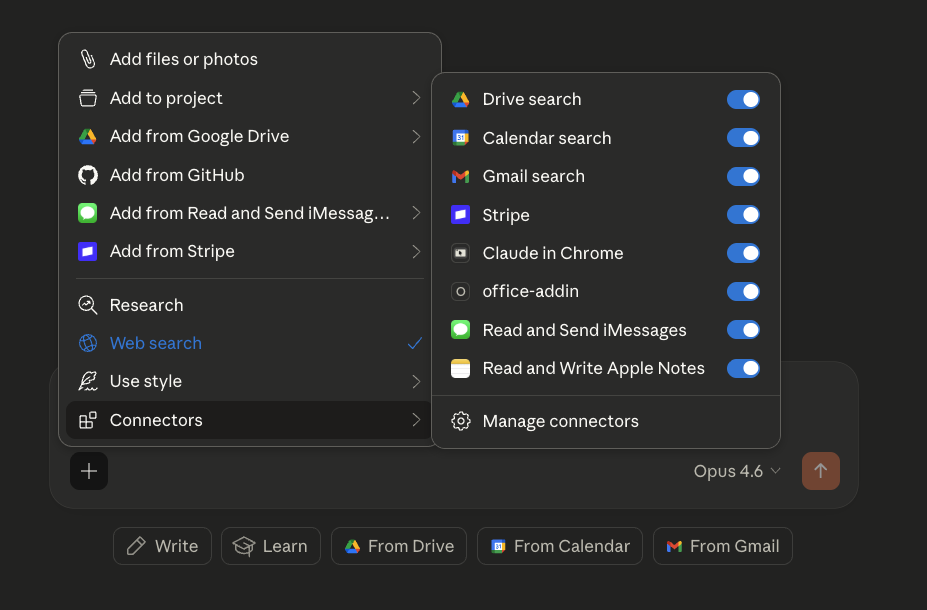
This is where AI starts to feel less like a chatbot and more like an assistant. Instead of switching between six different apps to get something done, you're doing it all from one interface. The more tools you connect, the more useful it becomes, because the AI can pull context from multiple sources to give you better answers.
MCP: connecting everything else
Pre-built integrations only cover the most popular tools. If you use something that doesn't have one, you're stuck copying and pasting between apps. That's the problem MCP solves.
MCP (Model Context Protocol) is a standard way for any application to talk to your AI tools. If a pre-built integration is like a dedicated cable that only fits one device, MCP is like USB. One connection standard that works with everything.
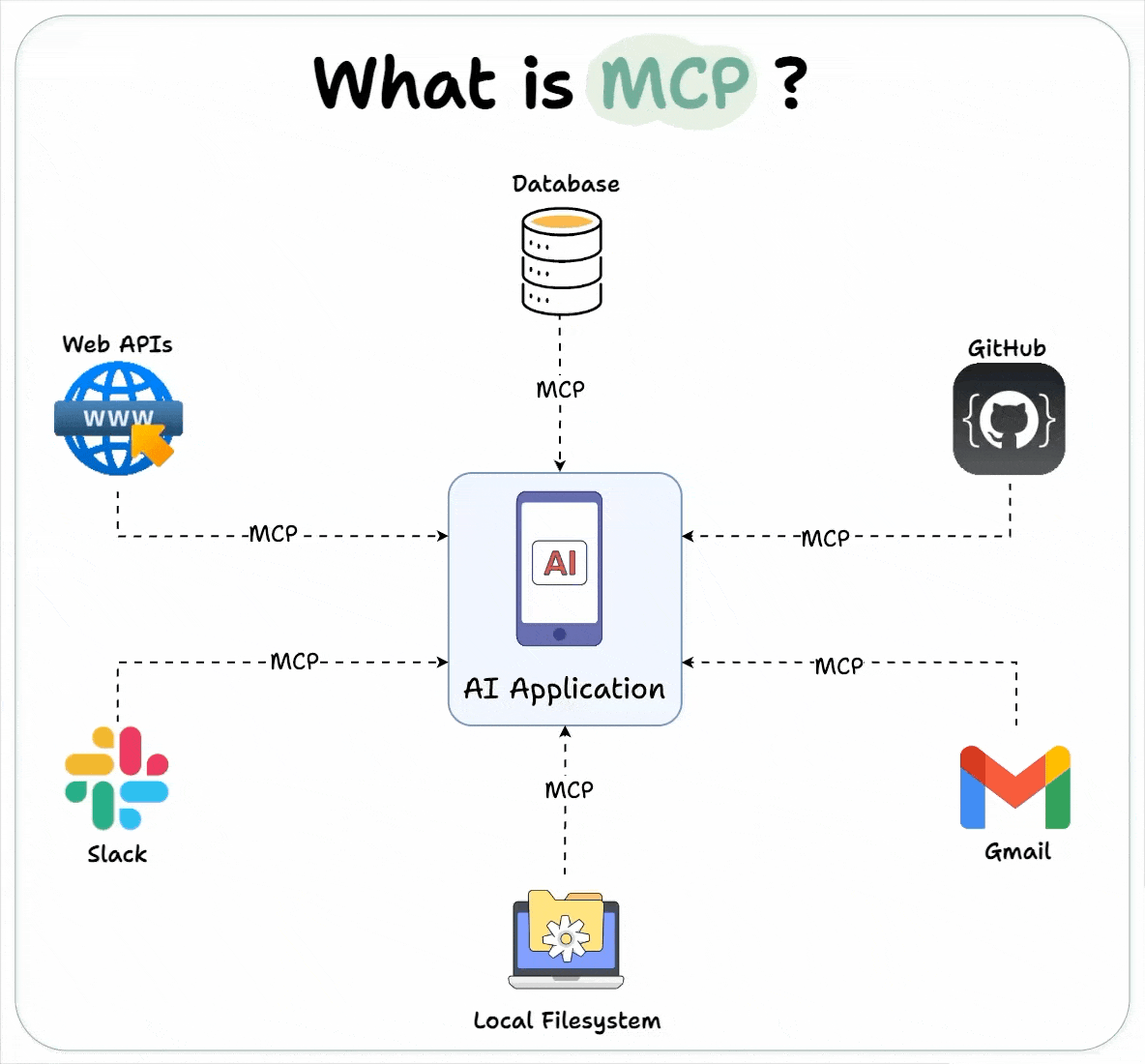
In practice, it means the AI can interact with your database, your project management tool, your file system, your version control, and anything else with an MCP integration. All from one place, without someone needing to build a custom connector for each one.
MCP is still early, but it's moving fast. If you're technical, it's worth exploring now. If you're not, just know that the trend is toward AI being able to talk to all your tools natively, not just the ones with pre-built integrations. A year from now, this will probably be standard. And if MCP sounds intimidating, remember: you can literally ask Claude "what is MCP and how do I set one up?" and it'll walk you through the whole thing step by step.
Building with context
Here's the thing that took me the longest to figure out: AI forgets everything between sessions. Every time you start a new conversation, it has no idea what you talked about last time. It doesn't remember your project, your preferences, your tech stack, or what you were working on yesterday.
The fix is simple but powerful. Keep your context in a notes app, specifically one that uses markdown files, and point the AI at it when you start a new session.
I use Obsidian for this. I keep a vault for each major project with a currentstate.md file that describes what's built, what's broken, and what's next. When I start a new AI session, it reads that file first. Every session starts with full context instead of me re-explaining everything from scratch.
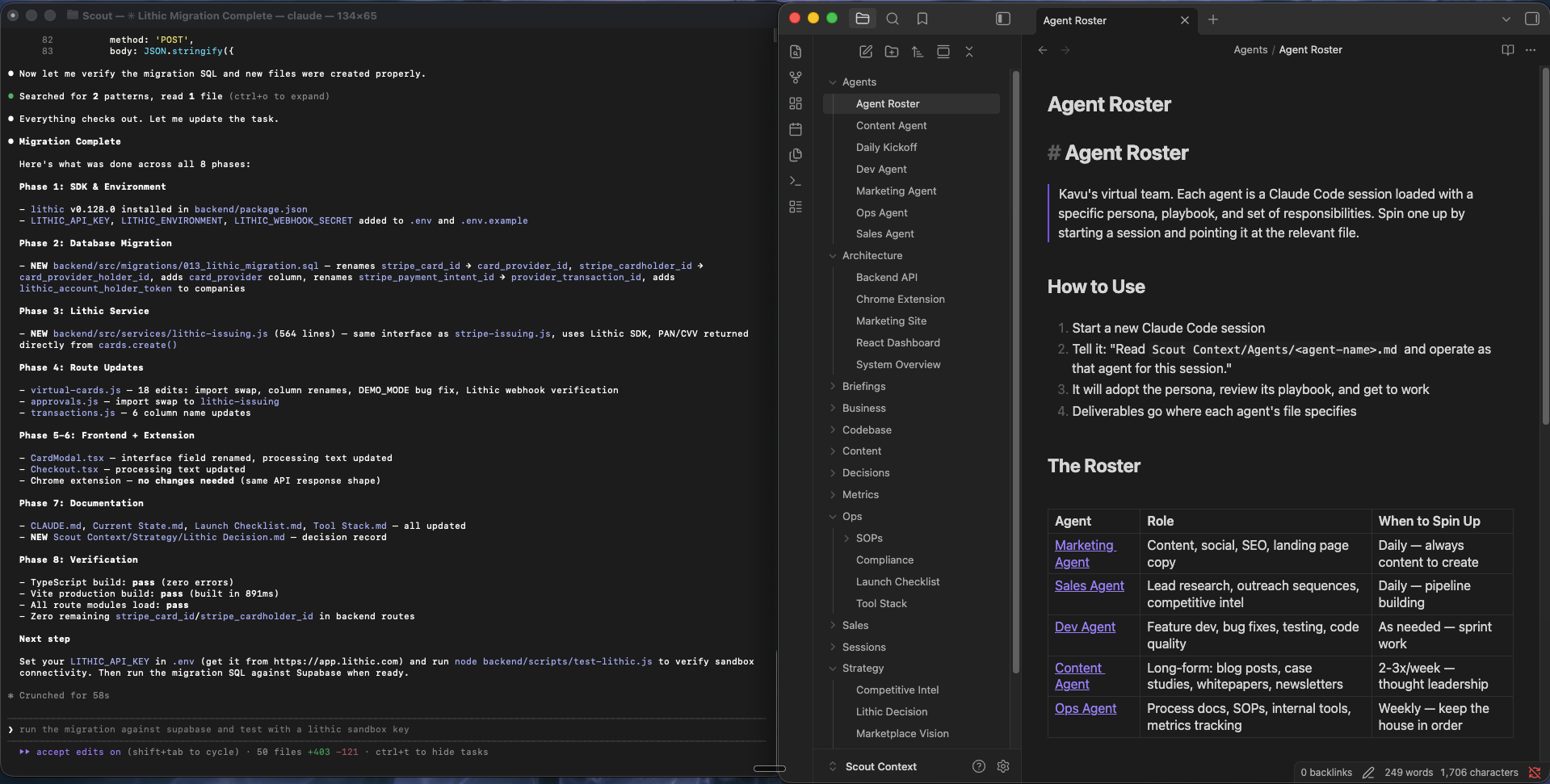
But it goes beyond just remembering where you left off. I use Obsidian to organize everything around a project: competitive research, architecture decisions, content calendars, strategy docs, launch checklists. The folder structure becomes a map of the whole project, not just the code. When I ask the AI to help me plan a feature or write a blog post, it can pull from the same knowledge base I use to make decisions.
The key insight is that Obsidian files are just markdown. AI tools can read and write them natively. So the vault becomes a shared workspace between you and the AI. You write strategy docs, the AI reads them when building features. The AI generates a competitive analysis, you review it and refine it. It's a feedback loop that gets better the more you use it.
Making it repeatable with skills
Once you find a workflow that works, you don't want to reinvent it every time. That's where skills come in.
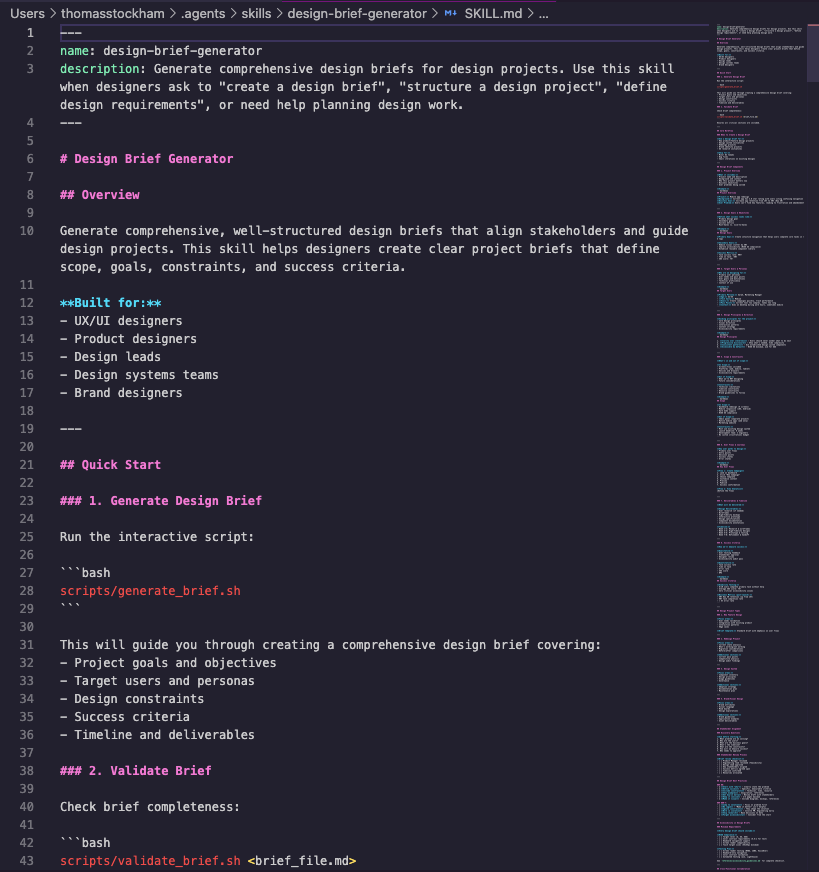
Skills are saved prompts or workflows that you can invoke with a single command. Instead of re-explaining what you want every time, you run /design-brief or /content-writer and the AI already knows the process, the output format, and the quality bar. Think of them like scripts, but for AI behavior instead of code.
If you find yourself giving the AI the same instructions repeatedly, that's a sign you should turn it into a skill. It saves time and it makes the output more consistent. The community around Claude Code has built hundreds of these, and you can browse and install them in seconds.
Now build something
Reading about AI only gets you so far. The best way to understand what it can actually do is to make it do something. Here's how to go from zero to building in about ten minutes.
Step 1: Get set up. Download the Claude desktop app or sign up at claude.ai. If you want the full agent experience (where Claude can create files, run code, and build things for you), install Claude Code in your terminal. Anthropic has a solid getting started guide if you need help with that.
Step 2: Create a project folder. Make a new folder on your Desktop. Call it whatever you want. This is where Claude will put the files it creates for you.
Step 3: Pick something to build. Don't overthink this. Pick something small that sounds fun. A few ideas:
- A personal portfolio website
- A tool that tracks your daily habits
- A simple budgeting calculator
- A recipe organizer
- A quiz game about a topic you like
Step 4: Tell Claude what you want. Open the Claude desktop app and click the "Code" tab at the top. Choose the folder you just created. Now describe what you want to build. Use what you learned about prompting: give it context about who it's for, what it should look like, and what features matter. Something like: "Build me a simple personal website with a bio section, a list of my projects, and a contact form. Keep the design clean and minimal. I like dark backgrounds with light text."
Step 5: Iterate and explore. The first version won't be exactly what you imagined. That's the fun part. Tell it what to change. "Make the header bigger." "Add a section for blog posts." "Change the color scheme to blue." Each time you give it feedback, it gets closer to what you want.
If anything confuses you along the way, just ask. That's one of the most underrated things about working with AI: it's also the best teacher you'll ever have. If Claude creates a file and you don't understand what it does, say "explain what this code does in plain English." If it uses a term you've never heard, say "what does that mean?" There's no penalty for asking questions, and the answers are usually better than what you'd find searching on your own.
You don't need to know how to code to do this. You don't need to understand every concept in this article before you start. The tools are good enough now that you can learn by doing, and Claude can fill in the gaps as you go. Anthropic's prompt engineering guide is worth a read if you want to get better at giving direction, but honestly, the fastest way to learn is to just start building and see what happens.
I'm still figuring a lot of this out myself. The tools are evolving fast, and what works today will almost certainly look different in six months. But the core ideas, give more context, use agents not chatbots, connect your tools, keep persistent notes, those aren't going anywhere. They're the foundation that everything else builds on.
You can see the tools I use to build for a more specific look at my stack.